
5 Best Time Clocks for Small Business in 2026
BLOG Last updated November 1, 2026
Most small businesses do not need a full HR suite to know who worked when. They need staff to clock in quickly, hours they can trust, and a clean export to payroll at a price that does not climb every time they hire. Here are the five time clocks small businesses ask us about most, compared on exactly that.
The quick answer
| Time clock | Best for | 20 staff |
|---|---|---|
| 1. Timeclock.Kiwi | Businesses with a shared workplace (workshops, factories, warehouses, retail) that want a fast kiosk without paying for every staff member. | $5 / month |
| 2. Clockify | Office and agency teams tracking time against projects and clients. | $109.80 / month |
| 3. BambooHR | Companies already using BambooHR for HR that want time in the same system. | $120 / month |
| 4. QuickBooks Time | US businesses already deep in QuickBooks Online that want time to flow straight into it. | $220 / month |
| 5. Deputy | Multi site hospitality, retail and healthcare businesses with complex rosters and award rules. | $100 / month |
Disclosure: Timeclock.Kiwi is our product. We built it because the businesses we worked with were frustrated by the others, so take our ranking with that in mind and read the honest weaknesses we list for it below.
No credit card, works on any tablet you already own.
What makes a good small business time clock
- Fast clock in: if clocking in takes more than a few seconds, you get queues at the start of every shift and staff who "forget".
- Hours you can trust: a photo, PIN or location check so people cannot clock in for each other.
- Payroll export: hours should go straight into your payroll without retyping.
- Predictable cost: per employee pricing punishes you for growing. Check what 20 or 50 staff will really cost.
- No hardware lock in: software that runs on a normal tablet beats a proprietary machine you cannot reuse.
Pricing comparison
| Pricing model | 20 staff | 50 staff | 100 staff | |
|---|---|---|---|---|
| Timeclock.Kiwi | $5 per kiosk, unlimited staff | $5 | $5 | $5 |
| Clockify | Per user | $109.80 | $274.50 | $549 |
| BambooHR | Per user, quote only | $120 | $300 | $600 |
| QuickBooks Time | Base fee + per user | $220 | $520 | $1,020 |
| Deputy | Per user, $30 minimum | $100 | $250 | $500 |
Monthly prices in USD for the cheapest plan that includes a time clock, checked October 2026. All five run on a tablet you supply yourself. QuickBooks Time also needs a QuickBooks Online subscription on top.
1. Timeclock.Kiwi
Good:
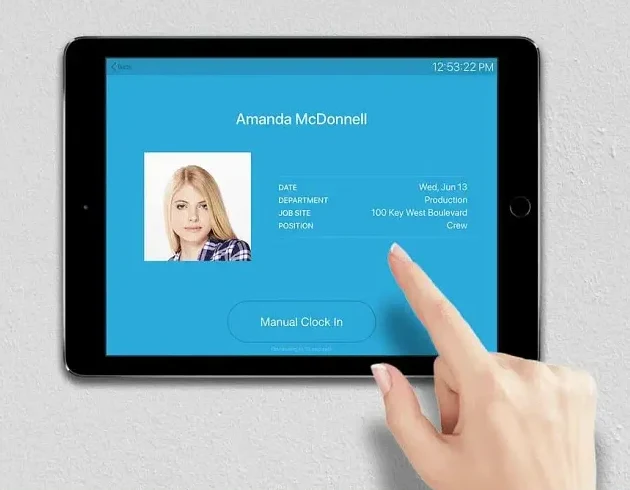
- Clocking in takes seconds: staff tap their name and enter a PIN, and a photo is taken in the background to stop buddy punching.
- No per employee fees: $5 per kiosk per month and $10 per roster, whether you have 5 staff or 500.
- Payroll exports: direct exports to Xero, QuickBooks, Gusto, ADP, MYOB, Paychex, Paylocity, iPayroll and more.
- Job and material tracking: very useful for trades, workshops and construction.
- Mobile app: GPS clock in for staff in the field, with protection against faked locations.
Bad:
- No HR suite: it focuses on time tracking and rostering, without the hiring and performance tools of BambooHR.
- Simpler scheduling: rostering covers most businesses, but it is not as deep as Deputy's.
- Relatively new: a younger company than the others here, with a smaller ecosystem of add-ons.

Want to see if it suits your team? Set it up on any tablet in a few minutes and try it free for 3 months.
2. Clockify
Good:
- Free tier: a generous free plan for project time tracking, great for freelancers and office teams.
- Project tracking: excellent for billing time to clients, with detailed reports.
- Cross platform: web, desktop and mobile apps.
Bad:
- Kiosk costs extra: the kiosk and PIN clock in need a paid plan, approvals and overtime need Standard, and GPS needs Pro.
- Per user pricing: every new employee adds to the bill.
- Built for projects: attendance for shift workers feels like an add-on.

3. BambooHR
Good:
- Complete HR suite: hiring, onboarding, performance and time tracking in one place.
- Clean interface: known for a tidy, approachable design.
- Good reporting: strong HR reports.
Bad:
- Cost: time and attendance is an add-on to an HR subscription, and pricing is quote only.
- Overkill for basic needs: if you only need a time clock, you are paying for a lot you will not use.
- Setup time: all those features take time to configure.
4. QuickBooks Time (formerly TSheets)
Good:
- QuickBooks integration: hours flow straight into QuickBooks Online payroll and invoicing.
- GPS tracking: location checks for mobile employees, and geofencing on Elite.
- Scheduling: solid scheduling built in.
Bad:
- Cost: a monthly base fee plus about $10 per user after the July 2026 price rise, and you need QuickBooks Online too.
- Tied to QuickBooks: little reason to use it if you are on other accounting software.
- Complexity: lots of features make it slower to learn.

Read our full QuickBooks Time review
5. Deputy
Good:
- Scheduling: excellent for businesses with complex, changing rosters.
- Mobile app: a well designed app for clocking in and managing shifts.
- Task management: tasks are tied to shifts.
Bad:
- Pricing: per user with a $30 monthly minimum, and HR, messaging and analytics are paid add-ons.
- Setup: a lot to configure before it runs smoothly.
- Expensive for simple needs: if you mainly need clock ins, you pay for scheduling depth you will not use.

Frequently asked questions
What is the cheapest time clock for a small business?
For a team clocking in at one workplace, a tablet kiosk priced per device rather than per employee is usually cheapest. Timeclock.Kiwi is $5 a month per kiosk whatever your headcount, while per user products like Deputy, Clockify and QuickBooks Time cost $100 to $220 a month for 20 staff.
Do I need to buy special time clock hardware?
No. All five time clocks in this list run on an ordinary Android or iOS tablet, so a $100 to $200 tablet mounted on the wall is all the hardware you need. Proprietary fingerprint and card machines cost hundreds of dollars and lock you in to one vendor.
Which time clock works with my payroll?
QuickBooks Time works best with QuickBooks, and Gusto's time tools with Gusto payroll. Timeclock.Kiwi exports directly to Xero, QuickBooks, Gusto, ADP, MYOB, Paychex, Paylocity, iPayroll and more, so it works with most payroll systems.
In conclusion
If you need a full HR suite, BambooHR is the most complete. If your business runs on QuickBooks or lives and dies by complex rosters, QuickBooks Time and Deputy are strong choices at a per employee price. But if you mainly want staff to clock in quickly on a shared tablet, with hours that go straight to payroll and a bill that does not grow with your team, Timeclock.Kiwi is the simplest and cheapest of the five.
Still not sure? We have reviewed every time clock we could find, including free plans, mobile apps and hardware clocks.
Free for 3 months, no credit card required.

Loïc Joachim
Loïc Joachim is a New Zealand-based IT professional, entrepreneur, and political figure, currently serving as the Managing Director for Timeclock.Kiwi and the IT Manager for the O'Brien Group. He is also involved in politics as the Deputy Chair of the Dunedin Labour Party and is a prolific writer who shares his knowledge and opinions on technology, business, and political affairs.