
Shift Scheduling is Here!
NEWS Last updated October 25, 2026
It is the feature we have been asked for more than any other, and it is finally live. Timeclock.Kiwi now does shift scheduling. You can build your roster, publish it to your team's phones, and then see what shifts actually got worked, all in the same place your staff already clock in.
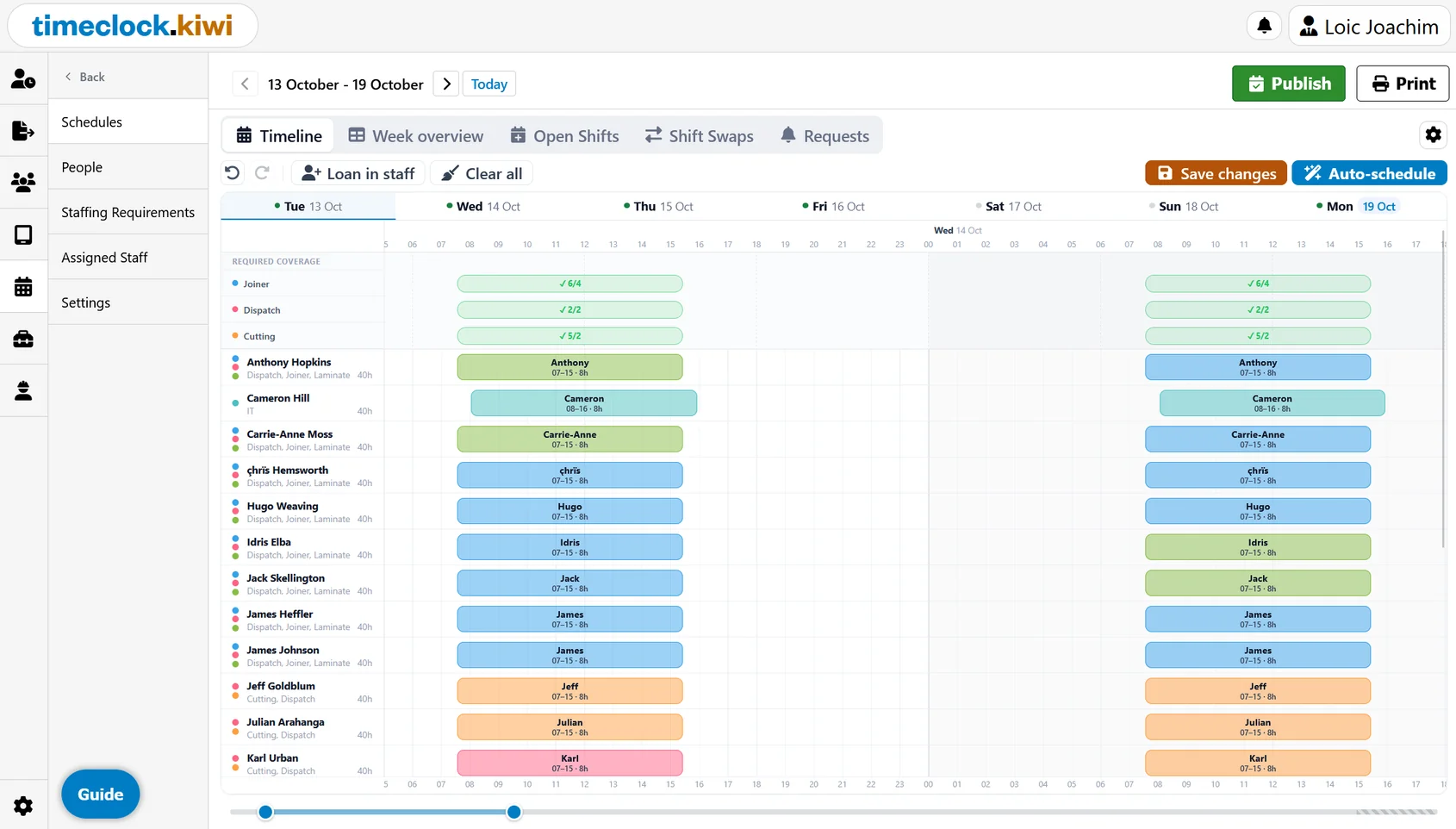
We have been building this since June and testing it with a handful of customers over the last few months. A big thank you to everyone who put up with the early versions and told us what was missing.
How it works
There are three steps:
- Set who you need. Tell us how many people you need, when, and with which skills. For example two baristas from 6am and one supervisor all day.
- Auto schedule. One click fills the week around everyone's availability, skills, days off and your rules.
- Publish. Staff get their shifts on the mobile app with a push notification and email, accept them, and get reminded before each shift starts.
If you have never built a roster in software before, don't worry. A step by step setup guide walks you through creating your first schedule and highlights the next thing to do.
Auto scheduling that follows your rules
Auto scheduling looks at each person's availability, skills, minimum weekly hours and the rest time they need between shifts. It avoids creating shifts that would cause a warning, and it tries to keep each person's shifts back to back so nobody ends up with a 2 hour shift on a Tuesday and another on a Thursday.
Of course you can still drag things around yourself. Every change is checked against your rules as you make it, so you will get warned about things like a clopening with too little rest, or someone booked outside their availability, before the roster goes out rather than after.
Most weeks look pretty similar, so you can also copy last week's roster or save a week as a template and just tweak what changed.
Your team handles the everyday changes
Once a schedule is published, staff can do a lot of the back and forth themselves from the mobile app:
- Day off requests: staff request days off, you approve or decline, and the schedule takes them into account.
- Open shifts: post shifts that still need someone and let your staff pick them up.
- Shift swaps: staff swap shifts with each other, and you approve each swap. The same rule checks run before it goes through.
- Skills: staff can suggest skills they have, for a manager to approve.
For anyone who doesn't use the app, you can print the roster for the staff room wall or save it as a PDF.
Multiple locations and Fair Workweek
If you run more than one site, you can build a roster per location with the staff that belong there, and loan in people from other sites when you are short. To make this work, groups can now be nested and location details have moved into groups.
For our customers in the United States, each schedule also has a Fair Workweek setting. It warns you if you publish inside your notice period and logs every change with how much notice it gave. If you want to know more about these laws, have a read of our guide to Fair Workweek and predictive scheduling.
Pricing: never per employee
Almost every other rostering tool charges per employee, which means the bill goes up every time you hire someone. We didn't want to do that.
Each schedule is a flat $10 USD a month, with unlimited staff. It shows up as its own line on your subscription, separate from your kiosks, and kiosk pricing hasn't changed. Schedules are also covered by the same 3 month free trial, so you can try it properly before paying anything. Have a look at the pricing page for the details.
Getting started
If you already use Timeclock.Kiwi, just head to "Schedules" in the portal sidebar and the setup guide will take it from there. If you are new, have a look at the feature page and start your free trial.
This is the first release, and there is plenty more we want to add. If something is missing or doesn't quite fit the way your business works, please reach out and let us know. A lot of what is in this release came from exactly those conversations.

Loïc Joachim
Loïc Joachim is a New Zealand-based IT professional, entrepreneur, and political figure, currently serving as the Managing Director for Timeclock.Kiwi and the IT Manager for the O'Brien Group. He is also involved in politics as the Deputy Chair of the Dunedin Labour Party and is a prolific writer who shares his knowledge and opinions on technology, business, and political affairs.